

RTC Device SDK
Krisp Device SDK: a C++ library for noise and background voice cancellation for Mac, Windows, Linux, IOS and Android.
Krisp RTC Device SDK is a C/C++ library for Windows, macOS, Linux, Android and IOS. It can also be integrated into Electron or other frameworks: see Integrations with Apps.
Supported audio
Audio frame duration
10ms, 15ms, 20ms, 30ms, 32ms *
Audio sample rates
8KHz, 16KHz, 32KHz, 24KHz, 44.1KHz, 48KHz, 88.2KHz, 96KHz
Example
The technical integration of Krisp Audio SDK should have correct sequence of functions invocation. The following example shows how to use the exposed functions. For more details, please refer to the sample apps.
try
{
    globalInit(L"");

    ModelInfo ncModelInfo;
    ncModelInfo.path = weightFilePath; // .kef file

    NcSessionConfig ncCfg =
    {
        inRate,
        frameDurationMillis,
        outRate,
        &ncModelInfo,
        withStats,
        nullptr // Ringtone model cfg for inbound stream case
    };

    std::shared_ptr<Nc<SamplingFormat>> ncSession = Nc<SamplingFormat>::create(ncCfg);

    while(frameAvailable)
    {
        ncSession->process(inFrame, inFrameSize, outFrame, outFrameSize,
                           noiseSuppressionLevel, withStats ? &perFrameStats : nullptr);
    }

    // ncSession is a shared_ptr. Free pointer before globalDestroy()
    ncSession.reset();
    globalDestroy();
}
catch(std::exception& ex)
{
  // Handle exception
}
Background Voice Cancellation
Device Requirements
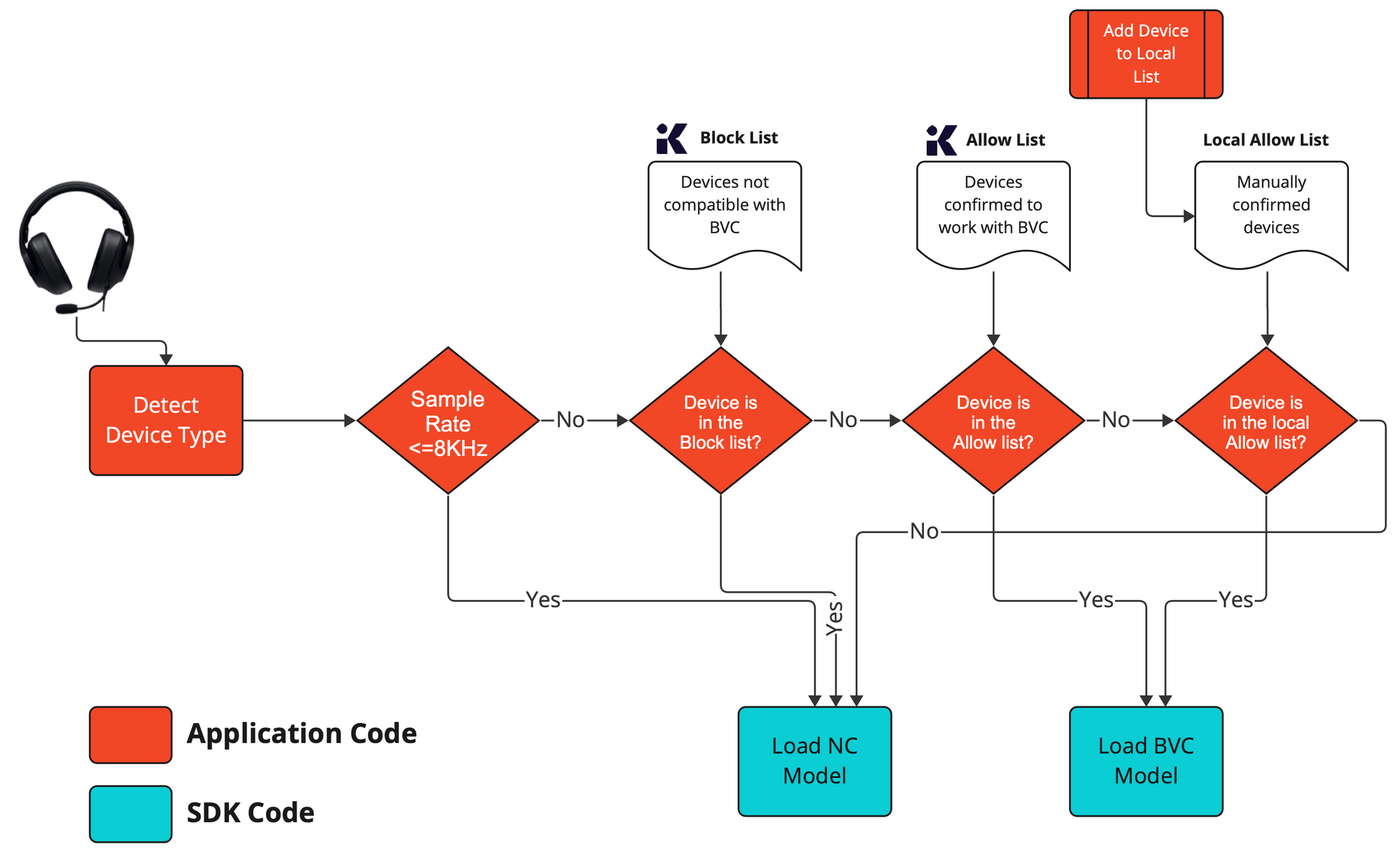
Implementing the BVC integration requires detecting the connected audio device, matching against the allow/block lists tested by Krisp, and optionally comparing it to the local allow list.
| Device List | Description |
|---|---|
| Krisp allow list | These devices have been tested and approved by Krisp. You may safely enable BVC automatically. |
| Krisp block list | These devices have been tested and rejected by Krisp as they showed poor performance and quality. You are not recommended to enable BVC on these devices. |
| Local allow list | If the connected device is not in the allow or block list, you may still want to allow the user to enable BVC manually. Then, the app may maintain a local allow list for devices to look up for enabling BVC. |
Recommended Pipeline
RTC Device SDK Integrations
We have developed a series of how-to's to ensure seamless integration of Krisp SDK into a wide variety of applications and environments using the most common web and communication frameworks. These guides are regularly updated to reflect the integration requirements and examples from our constantly growing customer base.

These guides explain how to integrate Krisp SDK into Android and iOS apps using WebRTC, a real-time communication framework that enables web-based voice and video calls. By integrating Krisp with WebRTC, you can provide your users with noise-free communication directly in the browser.

The guide explains how to integrate Krisp Audio SDK with Twilio Video on IOS.
Performance
Outbound Noise Cancellation Performance

Benchmarks were conducted for the following devices:
Dell Inspiron 15 5000 11th Gen Intel Core i5-1135G7, 2.4GHz 16GB RAM
MacBook Pro Intel 2019 Intel Core i5 2133MHz LPDDR3, 1.4GHz 8GB RAM
MacBook Pro M1 13″ 2020 Chip Apple M1, 8GB RAM

Benchmarks were conducted for Desktop SDK v9.0.0 using data from Task Manager (Windows) and Activity Monitor (macOS).
Inbound Noise Cancellation Performance

Benchmarks were conducted for the following devices:
Dell Inspiron 15 5000 11th Gen Intel Core i5-1135G7, 2.4GHz 16GB RAM
MacBook Pro Intel 2019 Intel Core i5 2133MHz LPDDR3, 1.4GHz 8GB RAM
MacBook Pro M1 13″ 2020 Chip Apple M1, 8GB RAM

Benchmarks were conducted for Desktop SDK v9.0.0 using data from Task Manager (Windows) and Activity Monitor (macOS).
Background Voice Cancellation Performance

Benchmarks were conducted for the following devices:
Dell Inspiron 15 5000 11th Gen Intel Core i5-1135G7, 2.4GHz 16GB RAM
MacBook Pro Intel 2019 Intel Core i5 2133MHz LPDDR3, 1.4GHz 8GB RAM
MacBook Pro M1 13″ 2020 Chip Apple M1, 8GB RAM

Benchmarks were conducted for Desktop SDK v9.0.0 using data from Task Manager (Windows) and Activity Monitor (macOS).
Updated 5 days ago